If you know the name of your event or have a QR code, you can go ahead and open the Eventee Android app to look for your event. If you don't have this information, please continue here.
If you'd like to join the event through your browser, please continue here.
Download the Eventee Android app; you can see how it's done here.
If your app is fully downloaded, please go ahead and open it.
Did the app automatically open your event? Then you are all done. (This happens when using the email invitation)
If it didn't open your event, please use the search bar or QR code scanner to find your event.

Cannot get into the event? You might be joining a private event.
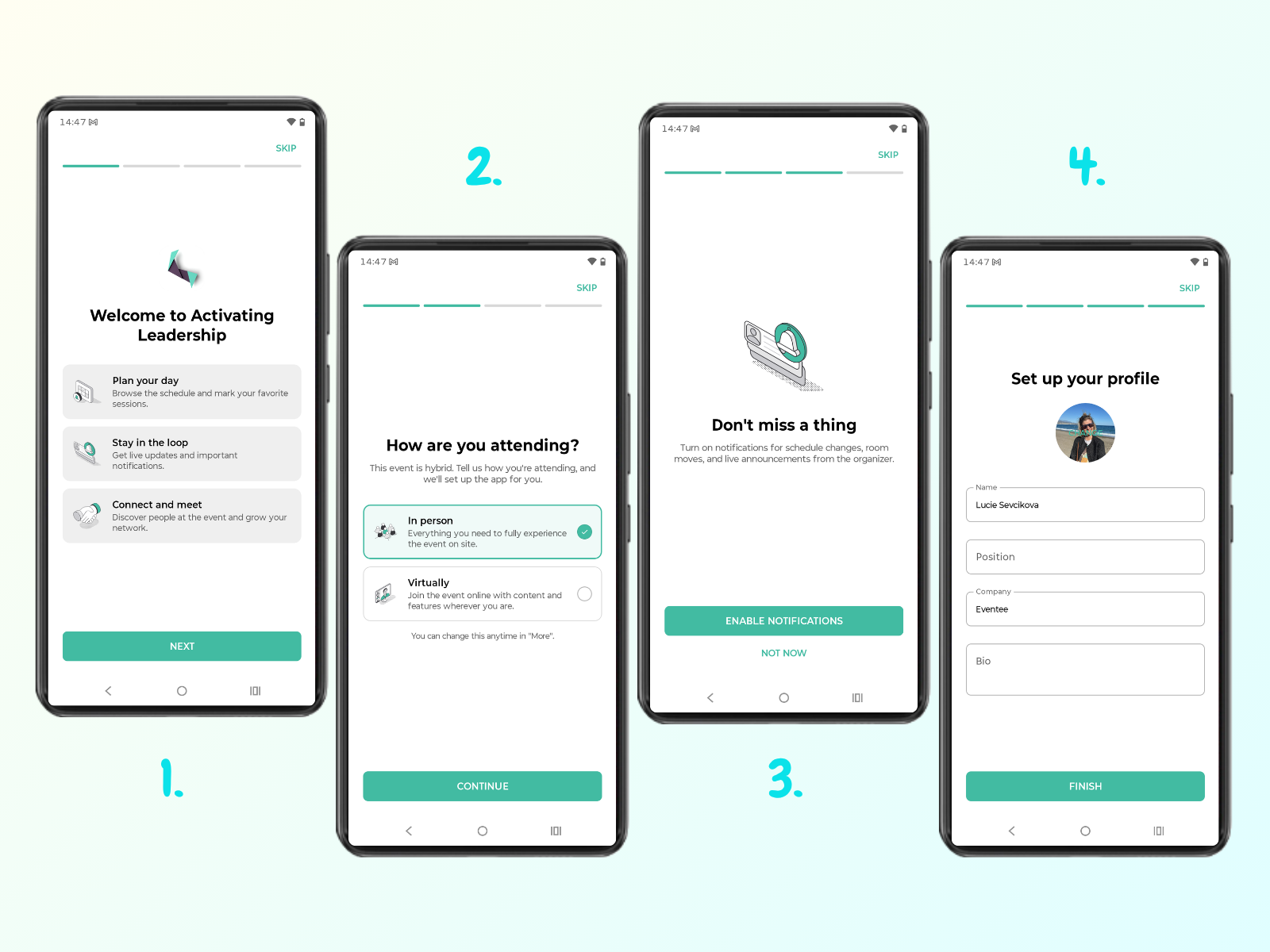
When you join the event for the first time, you will go through the onboarding flow. Based on the settings configured by the event organizer, onboarding consists of several steps:
“Welcome” screen
"How are you attending?" screen
This screen appears if the event is hybrid. You can select whether you are attending “In person” or “Virtually”. You can change your selection at any time by tapping More → Virtual event mode.
"Don’t miss a thing" screen
Here, you can choose whether to receive notifications from the app. You can update this setting later at any time.
"Set up your profile" screen
In the final step of onboarding, you can add details about yourself. This information helps with networking, allowing other attendees to learn about you and decide whether to connect